

O&O DiskImage 22.0.191 Pro/ 22.0.191 Premium

 (105 votes, 4.13 out of 5)
O&O DiskImage helps to create images and restore entire systems quickly and easily. It offers reliable protection from unforeseen data loss. This product has all standard and professional functions safely and easily to avoid losing important data!
O&O DiskImage lets you backup an entire computer or individual drives and files whenever you want. Never again will you have to worry about lost data. The backups you can restore with just a few clicks. Even if Windows is unable to start!
BUY NOW O&O DiskImage Premium
BUY NOW O&O DiskImage Server/ Professional
65% OFF (until December 9, 2025) Coupon Code: BLACKSALE25
O&O DiskImage lets you carry out a system restore and to duplicate or clone an entire PC or hard drive. You can even restore this backup onto a computer whose hardware is different from the original machine. For examlpe, if you have changed a motherboard on the target machine or have bought a brand new PC and want to restore an old backup onto it.
This O&O software combines features for both the home user and the IT expert in one single product. A whole range of default and user-defined options lets you create the backup scenario that suits you best. It also supports SSD drives and the latest UEFI System.
O&O DiskImage 22 Premium Features:
- Backup an entire computer with the push of a button
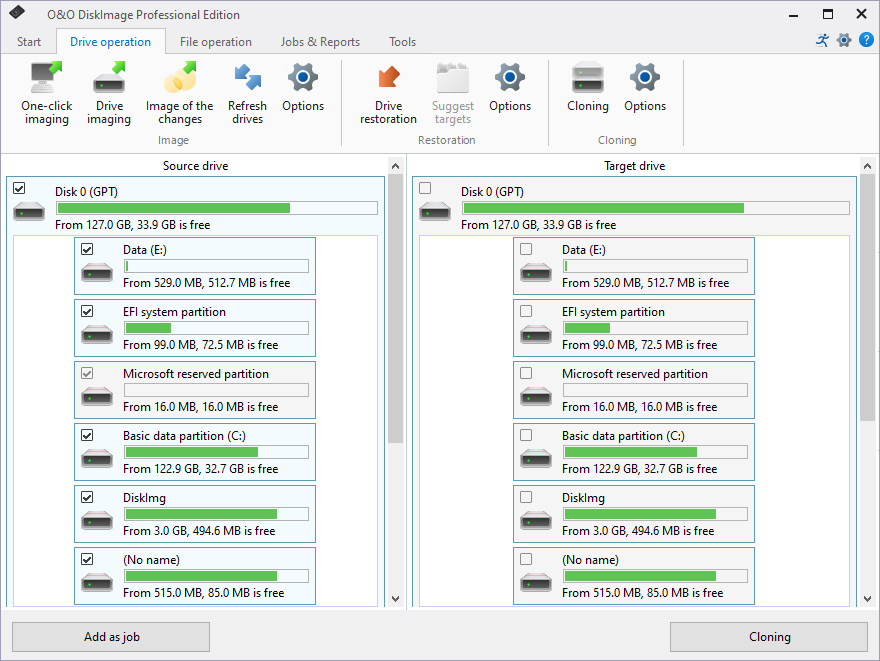
- Backup system and hard drives, clone drives and entire disks
- Brand new file-based backup: now twice as fast as ever before – backup and restore individual files and/or folders
- Direct creation of VHD/VHDX
- Monitoring and warning of security risks
- Incremental/differential backup: back up only the changes
- Easily restore files, folders, drives and disks
- System restore onto different hardware (M.I.R.)
- Create a Windows Boot system directly from within the program with driver integration
- Plug-and-play: Selected files and folders are automatically backed up and synchronized
- Variable pixel density settings: adjusts to the selected DPI setting of the connected monitor
- New and enhanced functions Control via Command Lines
Comprehensive VHD / VHDX functionality
With the new version 22 it’s possible to convert image files made with O&O DiskImage into Microsoft Virtual Hard Disc (VHDX as well as VHD) image files. This can be especially useful if someone wants to first “rehearse” migrating from Windows 10 to Windows 11 because you can do that using a virtual machine created on the current system.
The new O&O DiskImage can also create incremental and differential images of virtual drives. Combining or mounting these images is also possible. Whenever there’s a backup available, it only takes a few seconds to access any files. Work on the computer you can then continue without any loss of time or important data.
O&O DiskImage with its own recovery partition
Normally with a backup or imaging program you need to create a boot medium (USB) to boot up your system if something goes awry. This you have to either carry around or store somewhere safe in case disaster strikes.
Thanks to the integration into the system, the O&O DiskImage RecoveryPartition you can access immediately so that the last system image you can restore directly. Not only is this much more comfortable and quicker for the user, it also provides them with an extra level of security as this medium cannot get lost or damaged as easily as a “portable”, external one.
O&O DiskImage To Go
This new function automatically turns an external hard drive (or USB flash drive with enough storage space) into a boot medium and marks this disk as the preferred storage medium for future system backups. As soon as you then connect this external USB hard disk to your computer, O&O DiskImage automatically creates a backup. This makes it easy to create a recent backup.
Further functions:
All default and advanced features are in one single product
This backup software is the safest and easiest way to avoid losing important personal files! Options are available for both auto backup and manual settings. Thanks to a unique recovery system that includes additional system recovery tools combined with O&O DiskImage you’ll quickly be able to restore all your important data – even if the backup you’re using was created with an older O&O DiskImage version.
Backup entire PCs, hard drives or files with the push of a button
When you back up a PC, O&O DiskImage saves all personal files as well as hard drive information and individual settings. This not only protects irreplaceable files but, in a worst case scenario, also saves you the trouble of having to carry out a time-consuming new setup of programs and the Windows operating system. O&O DiskImage lets you back up an entire computer, system and hard drives or just individual files and folders. To make sure your backups are always up to date, we recommend creating them at short intervals from one another.
Quick and easy system restore – even onto different hardware
Restoring a backup is as easy as pie. All you have to do is start the program, select the backup you want to restore, and you’re off. Included with the software is our machine independent restoration which means your old backup can be transferred 1:1 onto a new machine. Hardware of a different make will be automatically recognized and Windows settings will be carried out by themselves.
Plug-and-play function
Anyone wanting to save data on an external hard disk has it even easier. Thanks to the integrated plug-and -play option, selected files and folders you can back up automatically. For example, an external hard disk is connected to the computer. This is ideal for users who forget to carry out regular backups or who don’t want to go through the trouble. Once configured, the auto backup function runs by itself.
Create a boot medium directly from within the program
O&O DiskImage can bring a system back to life immediately and with no installation required. It does so by way of a Boot Medium (USB Stick) which is based on the currently installed Windows system and which contains all the standard drivers required.
What’s New in DiskImage 22.0.1122:
Added:
- Backup Mounting and Management
- Backups can be mounted as drives under Windows
- Mounted backups under Windows can be removed
- Backups can be converted to virtual drives in VHDX format
- Retention policies for the maximum number of backups can be defined
- Individual backup files can be manually deleted from backups
- Automatically assign available drive letters when mounting backup images
- Improved handling of encrypted images with better password security
- Streamlined mounting process with fewer steps
- Report Management
- View and manage all backup reports in one place
- Display detailed information about backup operations
- Delete old or unnecessary reports with confirmation
- Reports are automatically loaded when the application starts
- View reports for each backup set in the backup management screen
- Reports are created for failed or canceled backups
- Boot Media
- The boot medium can now be used independently of the original hardware (e.g., when changing computers)
- FortressMode Logging
- Automatic logging when running in Windows Recovery Environment (WinRE)
- Log files are saved to RAM disk (X:) during recovery operations
- Logs are automatically copied back to the original location when exiting
- Comprehensive documentation for troubleshooting recovery scenarios
- Backup Validation
- Improved validation dialog that automatically detects file type (VHD/VHDX or backup files)
- Validation now uses the correct method based on the file being checked
- Backup Set Management
- Detection of incomplete backup sets (missing base backup)
- Restore option is disabled for backup sets without a complete base backup
- Clear status indicators showing backup set validity
- Ability to view backup information even when restore is not possible
- User Experience
- Helpful hints when a drive is too large to restore to available targets
- Suggestions for alternative file-based restore options
- Settings Management
- New tracking system for settings changes
- Confirmation dialog when applying backup settings globally
Changed:
- Backup Strategy
- The backup strategy in saved tasks can now be changed retroactively
- Compression
- ZIP-Deflated compression method is automatically replaced with standard compression for disk images, as the method is only valid for file backups
- Changed compression algorithm for disk images to LZNT1 for better performance
- Hardware Detection
- External USB drives are detected more reliably
- Performance
- Startup process optimized
- Faster application startup, especially with slow USB devices connected
- Background scanning of drives to prevent interface freezing
- Improved responsiveness during backup and restore operations
- User Interface
- Optimizations in dark mode
- Headers are now readable in dark mode
- Better visual feedback during operations
- Improved layout and text display in backup management screens
- Translations
- Fixed French translations where “Backup” was incorrectly translated
- Corrected multiple French translation errors
- Improved handling of localized text throughout the application
- Licensing
- Updated license system with improved validation
- Better handling of different machine IDs in recovery mode
- Installation
- Improved installation process with better component selection
- Updated installer packages for Windows Recovery Environment
- Corrected company name for Laplink OEM builds
- Backup Operations
- Improved calculation of space needed for backups
- Better handling of excluded files and folders in size calculations
- More accurate space requirements shown before starting backup
Fixed:
- FortressMode
- Creation of fortress mode corrected
- Licensing in fortress mode corrected
- Updates
- Update checks were not performed under certain circumstances
- Critical Fixes
- Fixed application freeze on startup when slow USB devices are connected
- Fixed crashes related to missing backup files
- Improved error handling to prevent unexpected application closures
- User Interface
- Fixed text display issues in backup size information
- Corrected layout problems in various dialogs
- Fixed missing links in help documentation
- Improved display of deleted backups in the backup list
- Domain Users
- Fixed detection of backup privileges for domain user accounts in scheduled tasks
- Resource Issues
- Fixed inconsistencies in displayed text and labels
- Corrected typographical errors in user interface
- Fixed application title display issues
- Installation
- Fixed errors during custom installation
- Corrected issues with Windows shell integration
Removed:
- Optical drives (CD/DVD) are no longer shown in backup source selection
Security:
- Enhanced password security for encrypted backup images using secure memory storage
- Improved authentication checks for domain user accounts
Info:
- Compatible with Windows 11 and Windows 10; x86, x64, and ARM architectures
- Available in German, English, French, Italian, Spanish, Russian, Japanese, and Simplified Chinese
Homepage – https://www.oo-software.com
Supported Operating Systems: Windows 10, 11 (64-bit).
Size: 88.4 MB
DOWNLOAD O&O DiskImage 22.0.1122 Premium Trial 64-bit
DOWNLOAD O&O DiskImage 22.0.191 Pro Update 64-bit
DOWNLOAD O&O DiskImage 22.0 Build 191 Pro Trial 64-bit
BUY NOW O&O DiskImage 22 Premium
BUY NOW O&O DiskImage Server/ Professional
BUY NOW O&O PowerPack
Contains DiskImage Pro, Defrag Pro, SafeErase Pro and O&O AutoBackup Pro
BUY NOW selected O&O Software
TOP ALTERNATIVES
-
 Kroll Ontrack offers Ontrack EasyRecovery software for home users and ...
 -
 Restorer Ultimate is a new generation of data recovery featuring a new...
 -
 Paragon System Backup 11 is designed to provide simple and automatic e...
 -
 Active Boot Disk is a bootable CD/DVD or USB flash media that allows y...
 -
 Acronis Backup for Server 11.7 is the leading backup and recovery for ...
 -
 IsoBuster is the ultimate data data recovery software that supports AL...
 -
 Comodo BackUp is an automatic file backup and recovery program. It bac...
 -
 Auslogics File Recovery is a high quality all-in-one file recovery sof...
 -
 AOMEI Backupper is a professional-like, easy-to-use backup and recover...
Leave a Reply
0 Comments on O&O DiskImage 22.0.191 Pro/ 22.0.191 Premium