

TweakNow WinSecret Plus 7.5.6 – 50% OFF


 (90 votes, 4.18 out of 5)
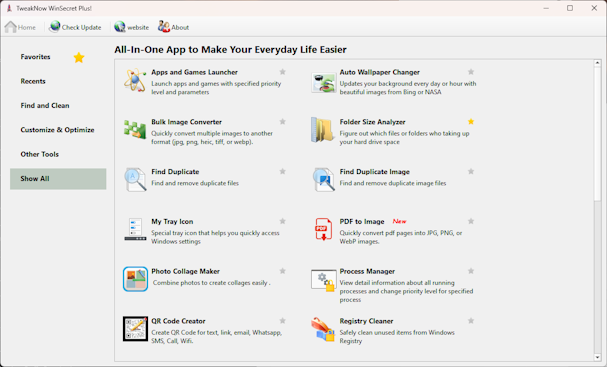
TweakNow WinSecret Plus for Windows 10 and 11 lets you safely and easily explore Windows hidden settings and improve your Windows 10 and 11 experience. This TweakNow program has gathered the most popular Windows registry settings and provide them for you in an easy and safe user interface.
As a long time Microsoft Windows user you might have heard about registry. The registry is a special file in your hard disk that hold most of Windows settings data.
BUY NOW TweakNow WinSecret Plus – $7.49 $14.99
This TweakNow WinSecret Plus application lets you move Windows taskbar to the top or change the taskbar size. You can easily do those tasks by simply editing the registry value. Unfortunately Windows registry is not a friendly place for most people.
Changing a wrong value in the registry may cause an unpredictable problem to your Windows. This is why novice users should not edit registry value directly using a registry editor by them self.
TweakNow WinSecret Plus Features:
- QR Code Creator. Create QR Code for text, link, email, Whatsapp, SMS, Call, Wifi.
- Bulk Image Converter. Convert multiple images to another format (jpg, png, tiff, or webp). Convert multiple images into single PDF file.
- Auto Dark Mode. Automatically change app and system theme mode to light or dark
- Auto Wallpaper Changer. Automatically change app and system theme mode to light or dark
- Find Duplicate. Find and remove duplicate files
- Folder Size Analyzer. Figure out which files or folders who taking up your hard drive space
- My Tray Icon. Special tray icon that helps you quickly access Windows settings
- Process Manager. View detail information about all running processes and change priority level for specified process
- Registry Cleaner. Safely clean unused items from Windows Registry
- Secure Delete. Completely and securely delete sensitive file from your hard drive
- Shortcut Keys. Create keyboard shortcuts for quickly opening apps, folder, or websites
- Smart Shortcut. Automatically specified priority level for your favourite apps
- System Information. Show detail information about your system
- Track Cleaner. Protect your privacy by eliminating traces of your digital activities
- Transparent Taskbar. Make your Windows Taskbar completely transparent
- Troubleshooter. Fix problem with Internet connection, icon, thumbnail, and Microsoft Store
- Windows Secret. Safely and easily explore Windows hidden settings
Find and remove duplicate files
Sometimes people unintentionally create duplicate copies of photo, music, and video files and put those files in some random folders. After times, the duplicate files will grow significantly in numbers and start taking a large amount of space in hard drive.
Trying to to get rid duplicate files manually surely is not a good idea. Checking a large number of folders to find duplicate files will be very tedious and time consuming task. Using Find Duplicates tool you can quickly find duplicate files in a single click.
Completely and securely delete sensitive file from your hard drive
When Windows delete a file (empty recycle bin), Windows is not actually remove the file’s data from the disk. For efficiency reason, it simply mark the location of the file as deleted and make that location available to be overwritten in the future. The problem is, while waiting to be overwritten the data is still sitting on the hard drive, and file-recovery tools can find the data and recover the file.
Secure Delete module is not only delete file. It also automatically write random data to the file’s location to make the file impossible to recover by a file-recovery tools.
Show detail information about your system
System Information gives you detailed information about your hardware, software and operating system. The information is compiled in 6 modules: Windows, Special Folders, Environment Variables, Startup Items, Windows Services, Task Scheduler, Audio & Video Codec
What’s New in TweakNow WinSecret Plus 7.5.6:
- Troubleshooter: Updated Clear Icon Cache. The utility now terminates the Windows Explorer process to release file locks before cleaning, then automatically restarts the shell.
What’s New in TweakNow WinSecret Plus 7.5.5:
- Added a dedicated menu for managing system timeouts and disabling animations, designed to optimize your Windows performance and responsiveness.
What’s New in TweakNow WinSecret Plus 7.5.0:
- Apps and Games Launcher: Improved the UI to make creating app shortcuts easier and more intuitive.
What’s New in TweakNow WinSecret Plus 7.4.3:
- Windows Secret -> Effects: Added option to turn transparency effects on or off.
- Disabling transparency effects can slightly improve system performance, especially on lower-end hardware.
What’s New in TweakNow WinSecret Plus 7.4.2:
- Windows Secret -> File Explorer: Added option to turn system-wide tracking of your file history on or off.
- When you turn it off, Windows will stop recording the documents and images you have recently opened.
- Additionally, it will remove “Recent” items from the Quick Access view in File Explorer, the Start Menu, and the right-click “Jump Lists” on your taskbar icons.
What’s New in TweakNow WinSecret Plus 7.4.1:
- This maintenance release includes bug fixes and updated libraries to improve stability and ensure better compatibility with future versions of Windows 11.
What’s New in TweakNow WinSecret Plus 7.4.0:
- Windows Icon Generator: Added support for creating Windows Icons (ICO files) from SVG. Using an SVG file, you can create a pixel-perfect icon.
- Windows Icon Extractor: Improved support for extracting multiple icons from a single EXE file.
Size: 27.4 MB
DOWNLOAD WinSecret Plus for Windows
TOP ALTERNATIVES
-
 F-Secure Booster is a tune-up tool for PC and Android devices that imp...
 -
 xpy is a small program which let’s you tweak Windows according t...
 -
 xp-AntiSpy is a little utility that lets you disable some built-in upd...
 -
 Microsoft PC Manager is a free app that helps you manage your PC. It g...
 -
 Yamicsoft Windows Manager is the complete solution to optimize, tweak,...
 -
 AVG TuneUp is your one-stop shop to help you get the most out of your ...
 -
 Ashampoo WinOptimizer 2025 is the optimization suite for a faster, lea...
 -
 TweakNow WinSecret allows you safely and easily explore Windows 10 and...
 -
 The latest Ashampoo WinOptimizer 2024 is technically state-of-the-art ...
Leave a Reply
0 Comments on TweakNow WinSecret Plus 7.5.6 – 50% OFF